


Showing all 2 results
A dive computer replaces the combination of depth gauge, timer, and dive tables with a single instrument that calculates decompression status in real time using a mathematical tissue model. The DB-01 by DIVEBRAIN is the dive computer available through this store — a full-colour wrist unit covering recreational, technical, and freediving modes with Bühlmann ZH-L16C decompression algorithm, support for air, nitrox, and trimix gas mixes, GPS positioning, and Bluetooth connectivity to the DiveStory PRO app on Android and iOS.

What a Dive Computer Does and Why It Matters
A dive computer tracks depth and time continuously throughout a dive and applies a decompression algorithm to calculate how much inert gas — primarily nitrogen, and in trimix configurations also helium — has been absorbed by the diver’s theoretical tissue compartments. It compares the current tissue saturation against safe ascent thresholds in real time, which is something a set of pre-dive tables cannot do: tables assume a square dive profile (constant depth throughout), while a computer adjusts calculations as the diver ascends, descends, and changes depth during the dive. For a typical recreational dive with a variable depth profile, this means a computer will generally give more bottom time than a table at the same depth — because the shallower portions of the dive are absorbing gas more slowly than the deepest point.
For technical divers using multiple gas mixes, the computer also manages decompression gas switches — tracking which gas is active, what partial pressure of oxygen that gas delivers at the current depth, and when the diver has passed the depth at which switching to a richer mix becomes advantageous for decompression efficiency.
DB-01: Technical Specification and Capabilities
The DB-01 runs the Bühlmann ZH-L16C algorithm with 16 parallel tissue compartments and user-adjustable gradient factors — the GF Low and GF High settings that allow the diver to increase or decrease the conservatism of the model relative to the base algorithm. This is the decompression framework used across most modern technical diving computers and training agencies; familiarity with gradient factor interpretation is assumed for technical use but not required for recreational air diving, where default settings are appropriate.
Gas support covers air, nitrox up to 99% O₂, and trimix with five preset gas slots assignable as bottom gas, travel gas, and decompression gas, each with an independently configurable maximum PO₂ setting. The dive modes are: REC (recreational scuba), TEC (technical), freediving, instrument/gauge mode, dive planning, and navigation. The freediving mode tracks surface interval, last depth, last dive time, and includes a stopwatch — the full set of parameters a freediver needs without the decompression calculation overhead of scuba mode.
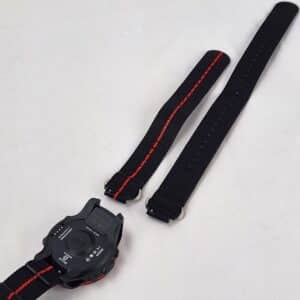
The display is a 1.22-inch colour LCD at 240×240 pixel resolution with automatic backlight, rated readable in direct sunlight. The lens uses Corning Gorilla Glass, a chemically strengthened aluminosilicate glass with substantially higher scratch resistance than standard mineral glass or acrylic. The housing ring is fibre-reinforced polymer. The unit weighs 75 g, and the strap is a nylon webbing band with a quick-release buckle. The depth rating is 100 m (10 ATM). GPS and an electronic compass are integrated for dive site positioning and navigation. The rechargeable battery delivers approximately 25 dives per charge at an average 45-minute dive duration, with 14 days of standby life; the recharger uses a 4-pin plug with a mini-USB cable included. Battery cycle life is rated at 300+ full charge cycles.
Dive log capacity is 1,000+ dives with built-in access to a database of over 9,000 dive sites globally. Logged dive data — depth profile, temperature, gas used, GPS location — transfers to the DiveStory PRO app via Bluetooth. The app is available for both Android and iOS and allows the diver to view dive charts, add site photographs, and browse location data for each logged dive.
Decompression Algorithms and Gradient Factors
The Bühlmann ZH-L16C model, which the DB-01 uses, divides the diver’s theoretical body into 16 tissue compartments each with a defined half-time for nitrogen (and helium in trimix configurations). Each compartment absorbs and releases inert gas at a rate determined by its half-time; the algorithm calculates the maximum partial pressure each compartment can tolerate at a given depth without exceeding its M-value — the ceiling above which the tissue is at risk of decompression sickness. Gradient factors modify these M-values by a percentage: GF Low sets the conservatism for deep stops, GF High sets it for the final stop depth and surfacing. A conservative setting such as GF 30/85 imposes more caution than the algorithm’s native limits; a permissive setting such as GF 45/95 brings the diver closer to the theoretical maximum.
For recreational no-decompression diving, the diver simply monitors the no-decompression limit (NDL) displayed in real time. The computer handles all tissue calculations in the background; the diver needs to stay above the displayed ceiling (none, in a correctly planned no-deco dive) and surface with adequate time remaining. For technical diving with mandatory decompression, the computer displays a ceiling depth and stop time that the diver must complete before ascending further.
What to Look For
- Algorithm and gradient factor control. Bühlmann ZH-L16C with adjustable gradient factors is the current standard used across technical diving. Gradient factor adjustment allows the diver to tune conservatism to their individual physiology, dive history, and training agency guidance rather than being locked to a single manufacturer’s proprietary setting. Confirm that the computer you choose exposes gradient factor settings if technical diving is planned.
- Display readability in your specific conditions. The DB-01 uses a colour LCD with automatic backlight rated for sunlight readability. Colour displays with sufficient nit output are readable in most conditions; verify with the specification rather than assuming. Night diving and cave diving benefit from automatic backlight that activates without requiring a button press — a feature present in the DB-01.
- Gas mode coverage for your current and planned diving. Recreational air divers need only a single gas mode. Nitrox divers need EAN support up to at least 40%. Technical divers need multi-gas support with independent PO₂ settings per gas. The DB-01 covers all these cases including trimix with five gas slots. Buying a computer that covers your planned development trajectory avoids having to replace it as you progress.
- Battery type and recharge practicality. Rechargeable computers eliminate the need for battery replacement at inconvenient moments but require access to a charger. The DB-01 charges via a 4-pin connector with mini-USB cable, providing approximately 25 dives per charge. For remote liveaboard or expedition diving, charge the computer fully before departure and monitor remaining battery life against the dive schedule.
- Weight and wearability for daily use. At 75 g with a nylon strap, the DB-01 is light enough for daily wrist wear outside of diving. A computer worn constantly maintains a continuous nitrogen loading history between dives, which is more accurate for residual nitrogen tracking than one worn only during dives. Confirm the strap configuration is comfortable for your wrist dimensions.
Maintenance and Care
Rinse the DB-01 in fresh water after every salt dive, paying specific attention to the button seals and the charging port cover. Salt crystal deposits around button O-rings are the most common cause of button mechanism degradation over time. Do not submerge the charging port unless the cover is fully seated. Store the computer away from prolonged direct UV exposure — the fibre-reinforced polymer housing and display lens are UV-stable, but extended exposure accelerates ageing of the strap material. Recharge before the battery reaches full depletion; lithium-type rechargeable cells have longer cycle lives when not regularly discharged to zero. The lens is Gorilla Glass and highly scratch-resistant, but it should not be placed face-down on abrasive surfaces. Clean the display with a damp cloth — do not use solvents. Download the user manual from the product page before first use and read the algorithm and alarm configuration sections fully before relying on the computer for decompression management.
FAQ
What is Bühlmann ZH-L16C and how does it differ from other decompression models?
Bühlmann ZH-L16C is a mathematical decompression model developed by Swiss physician Albert Bühlmann, using 16 theoretical tissue compartments with half-times ranging from approximately 4 minutes to 635 minutes. Each compartment models a different tissue type in the body; the algorithm tracks nitrogen (and helium in trimix) absorption and elimination in all 16 compartments simultaneously and calculates the maximum ambient pressure — the M-value — that each can tolerate at any point in the ascent. The ZH-L16C variant uses coefficients validated for dive computer implementation. It is the algorithm underlying most recreational and technical dive computers in current production and is the basis on which decompression training curricula are built. Other models such as RGBM and VPM-B use different physical assumptions about bubble mechanics; ZH-L16C remains the most widely used baseline.
Can the DB-01 be used for freediving as well as scuba?
Yes. The DB-01 includes a dedicated freediving mode that tracks surface interval, last dive depth, last dive time, and provides a stopwatch function. Configurable alarms for depth and time can be set in freediving mode with both audible and vibration alerts. The freediving mode does not apply a decompression algorithm — it operates as an instrument mode, recording the physiological data relevant to breath-hold diving without the nitrogen tissue calculations used in scuba mode. Divers who combine freediving and scuba diving on the same day should be aware that nitrogen from scuba dives accumulates in the tissues and affects safe freediving — the computer manages scuba decompression tracking but does not calculate combined scuba/freediving risk profiles.
How do gradient factors work and what settings should I use?
Gradient factors are a user-adjustable modification to the Bühlmann M-values. GF Low sets the conservatism applied at the deepest stop in a decompression dive; GF High sets it for the shallowest stop and the ascent to the surface. A GF of 100 means the algorithm operates at its native M-values; a GF of 50 means stops are required at 50% of the theoretical M-value ceiling — more conservative. For recreational no-decompression diving, gradient factors are less critical because no ceiling exists to modify. For technical decompression diving, the settings should be guided by your training agency and dive supervisor guidance, beginning conservatively (e.g., GF 30/85) and adjusting only with experience and understanding of the underlying model.
Does the DB-01 support nitrox, and is there anything special I need to do to use it?
The DB-01 supports nitrox mixtures from EAN 21 to EAN 99 with a configurable maximum PO₂ for each gas preset. To use nitrox correctly, set the oxygen percentage of the mix you are breathing before the dive and confirm the maximum PO₂ setting — typically 1.4 bar for the working portion of the dive and 1.6 bar for decompression stops. The computer will calculate a maximum operating depth (MOD) based on these settings and alert you if you exceed it. Nitrox diving also requires the cylinder to be analysed and labelled before each dive and the diver to hold a nitrox certification from a recognised training agency.
How do I transfer dive logs to the DiveStory PRO app?
Enable Bluetooth on your phone and open the DiveStory PRO app — available on both Android and iOS. Follow the pairing procedure described in the DB-01 user manual to establish the Bluetooth connection between the computer and your phone. Once paired, the app retrieves logged dive data including depth profile, water temperature, GPS coordinates, and gas information. The app displays dive charts for each log entry and allows you to add notes and site photographs. The computer stores 1,000+ dives internally; sync regularly to ensure data is backed up on your phone before the internal log cycles through older entries.